I. Introduction
A. The Market Promise vs. Clinical Reality
Clinical Decision Support (CDS) has long been touted as a technology that can reduce clinical variation, improve outcomes, and enhance the overall quality of care. With the rise of value-based care (VBC) and the increasing pressure to deliver better results with fewer resources, many health systems and providers eagerly adopted CDS apps, believing they would streamline decision-making and deliver smarter, evidence-based recommendations at the point of care.
However, the reality has often been different. In practice, most CDS tools end up sitting outside the clinician’s established workflow, relegated to underutilized “dashboard” features or “nice-to-have” add-ons.
When clinicians are forced to leave their native electronic health record (EHR) environment, log into separate systems, or manually reconcile data, the promise of seamless, real-time decision support quickly fades. The result? These tools often fail to make a significant impact on clinical decision-making or outcomes.
B. Why This Matters Now
The need for effective, integrated CDS tools has never been more pressing. Healthcare systems today are under immense pressure to improve the quality of care while reducing clinician burnout.
At the same time, the shift toward risk-based reimbursement models, such as value-based care, requires timely, accurate decision-making to reduce costs and improve patient outcomes.
Moreover, EHR vendors are evolving, and interoperability standards, such as SMART on FHIR and CDS Hooks, are being developed to enable more integrated decision-support solutions.
The bar for CDS tools has been raised; clinicians no longer want a separate dashboard that requires them to leave their workflow to access a smart recommendation. They need decision support embedded within the EHR, activated in real-time during the care process.
C. Point of View
The problem with most clinical decision support apps isn’t the lack of clinical intelligence or data. It’s their failure to integrate into the workflows where decisions are made, at the right time, for the right patient.
In a world of value-based care, a CDS app creates value only when it acts at the moment of care, triggering the right decisions directly within the clinician’s workflow.
II. Why Most Clinical Decision Support Apps Fail
A. They Live Outside the Clinician’s Native Workflow
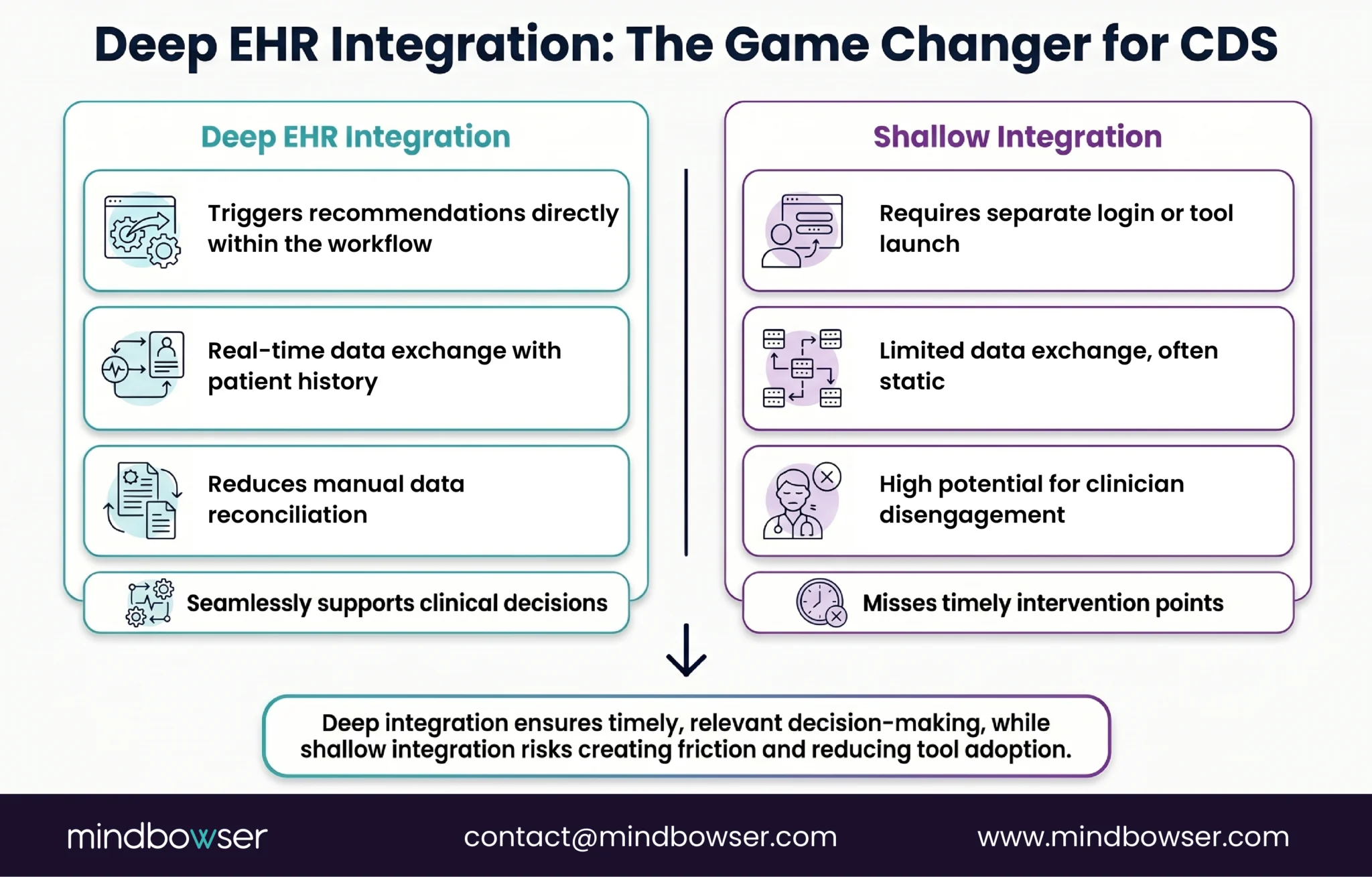
One of the primary reasons clinical decision support (CDS) apps fail is that they are designed as separate systems, disconnected from the clinician’s daily workflow. Clinicians are already inundated with tasks, patient information, and decisions.
When a CDS tool requires a separate login, forces clinicians to switch between applications, or disrupts their clinical tasks by displaying recommendations after the decision point, it creates friction that negatively impacts adoption.
Consider a primary care physician (PCP) on a busy day: if they need to leave the EHR to view a decision-support alert, the tool becomes a distraction rather than a helpful resource.
Even if the app provides valuable insights, the moment of care has passed, and the opportunity to influence the decision is lost.
This friction reduces trust in the tool, leading to low usage and potential alert fatigue. As the adage goes, “Nice insight, wrong place, wrong time” becomes the core reason why CDS tools fail.
B. They Lack the Right Clinical Context
A CDS app is only as useful as the context it provides. Most apps fail because they offer generic recommendations that don’t consider the full picture of a patient’s health.
Missing vital pieces of data, such as current medications, lab results, prior diagnoses, or social determinants of health, can lead to flawed recommendations.
For instance, if a CDS tool doesn’t integrate data about a patient’s recent hospital visit, it may suggest an inappropriate course of action.
The lack of patient context means the recommendations are based on static, one-dimensional data, which is far less valuable to the clinician than real-time, dynamic insights that take into account all available information at the moment of care.
This incomplete context leads to a lack of trust in the system and a reluctance to rely on its recommendations.
C. They Create Alert Fatigue Instead of Actionable Guidance
Another critical flaw of many CDS apps is their tendency to generate interruptive alerts that add to the already high cognitive load of clinicians. Alerts are meant to capture attention, but poorly designed thresholds and a lack of role-based logic turn them into a “cry wolf” situation.
When clinicians receive too many irrelevant or poorly timed alerts, they become desensitized, ignoring alerts altogether or opting out of the entire system.
Rather than pushing just alerts, an effective CDS tool should provide actionable guidance that reduces cognitive burden. Alerts should be triggered only when the data supports them and tailored to the clinician’s role and specific needs. This way, the alert isn’t just noise; it’s a valuable signal prompting the next step in patient care.
D. They Do Not Close the Loop
A significant challenge with many CDS tools is their inability to close the loop between recommendation and action. A system that can flag a risk but cannot place an order, or suggest a care pathway but can’t initiate the necessary task, renders itself passive and ineffective. It’s not enough for a CDS tool to identify problems; it must also facilitate action.
For example, if a CDS tool identifies a care gap, it should not only alert the clinician but also provide an easy way to assign the task, order the necessary tests, or initiate follow-up care. If the tool simply reports problems without offering a way to solve them directly within the workflow, it becomes just another piece of unused software.
E. They Ignore Clinical Governance and Safety
A major concern for healthcare organizations is the lack of clinical governance and safety oversight in many CDS implementations. Without clear ownership of clinical rules, thresholds, and updates, organizations are vulnerable to errors and safety risks.
The recommendation logic within CDS tools needs to be continuously reviewed and adjusted to keep up with new evidence, changing workflows, and evolving clinical standards.
Lack of transparency in the decision-making process, combined with inadequate version control, can create distrust among clinicians.
When safety isn’t built into the governance of a CDS tool, the entire system is at risk of causing harm or making incorrect recommendations, undermining the very purpose of clinical decision support.
F. They Fail to Prove ROI
Finally, one of the biggest hurdles for scaling CDS tools across health systems is proving their return on investment (ROI). Simply measuring adoption rates or the number of alerts triggered is insufficient. What healthcare leaders really care about is whether the CDS tool leads to tangible improvements in quality, utilization, throughput, and clinician efficiency.
If a CDS app cannot tie its impact to value-based care (VBC) metrics or show how it contributes to reduced readmissions, improved risk capture, or better patient outcomes, its budget approval is unlikely.
In the competitive world of healthcare, where every tool must demonstrate clear ROI, CDS tools that cannot deliver operational or clinical value will quickly fade from use.
III. What “Deep EHR Integration” Actually Means
A. It Starts with Embedded Workflow Triggers
The cornerstone of successful clinical decision support (CDS) lies in its seamless integration within the clinician’s workflow. A truly integrated CDS app activates at critical decision points, such as when a clinician opens a chart, enters an order, reviews test results, or documents notes.
The key here is timing: the recommendation must be delivered when the clinician is actively engaged in the decision-making process.
This trigger-based model of decision support ensures that the intervention is relevant and can prompt immediate action, rather than waiting for the clinician to review a static alert after the fact.
By embedding decision support into the flow of care, the tool becomes a natural part of the clinician’s thought process, rather than an external distraction. It can even shift behavior in real-time, offering the right support when and where it matters most.
B. It Uses Real-Time, Standards-Based Data Exchange
Deep EHR integration isn’t just about embedding decision support within the workflow; it also relies on modern, real-time data exchange standards like FHIR (Fast Healthcare Interoperability Resources). These standards allow CDS tools to access up-to-date, accurate patient data, which is crucial for making real-time, evidence-based recommendations.
SMART on FHIR is a prime example of this technology in action. It allows apps to be launched within the EHR context, enabling the CDS tool to function inside the clinician’s workflow with minimal disruption.
Furthermore, CDS Hooks, a critical event-driven framework, facilitates decision support by responding to clinical events in real time, ensuring that recommendations are timely and relevant. The ability to connect seamlessly to real-time data using these standards ensures the CDS tool always works with the most current information, providing accurate and context-aware guidance.
C. It Supports In-Workflow Action
Effective CDS goes beyond merely presenting recommendations; it enables clinicians to act on those recommendations directly within their workflow.
When a CDS tool delivers guidance, it should allow clinicians to take immediate action, such as accepting the recommendation, placing an order, adjusting medications, or launching a care pathway, all without leaving the EHR.
For example, if a CDS tool suggests changing a patient’s medication, the clinician should be able to modify the prescription directly within the system. Additionally, the tool should facilitate task assignments, such as routing a care gap task to a care manager or triggering follow-up appointments.
By supporting action within the workflow, the CDS tool closes the loop between insight and intervention, ensuring that decision support translates into real-world improvements in patient care.
D. It Respects Role, Setting, and Use Case
One-size-fits-all solutions don’t work in clinical environments, and neither should a CDS tool. A truly integrated system recognizes that different roles, settings, and specialties require different types of decision support.
For instance, the workflow for a primary care physician (PCP) differs significantly from that of a hospitalist or a care manager, and the decision support provided must reflect these differences.
The CDS tool must deliver relevant recommendations based on the clinician’s role and the care setting. Ambulatory care providers need different guidance than inpatient clinicians, and specialists require highly specific recommendations tailored to their area of expertise.
The ability to tailor recommendations to these unique needs is what ensures the CDS tool’s value and relevance across diverse care settings.
E. It Feeds Governance, Reporting, and Continuous Improvement
A robust CDS solution isn’t just about providing real-time recommendations; it also supports ongoing governance, quality improvement, and performance monitoring. By tracking overrides, acceptance rates, and outcomes, the CDS tool helps health systems refine decision-making over time.
Monitoring clinician behavior and identifying false positives is critical for improving the logic and effectiveness of recommendations.
Furthermore, this feedback loop feeds back into operational and reporting systems. It helps organizations assess how CDS interventions impact patient outcomes, utilization patterns, and downstream care.
By continually refining the tool based on real-world data, healthcare organizations can ensure their CDS systems remain relevant, effective, and aligned with evolving clinical evidence and standards.
IV. The Five Layers of Integration That Separate Winners from Failures
A. Layer 1: Identity and Access Integration
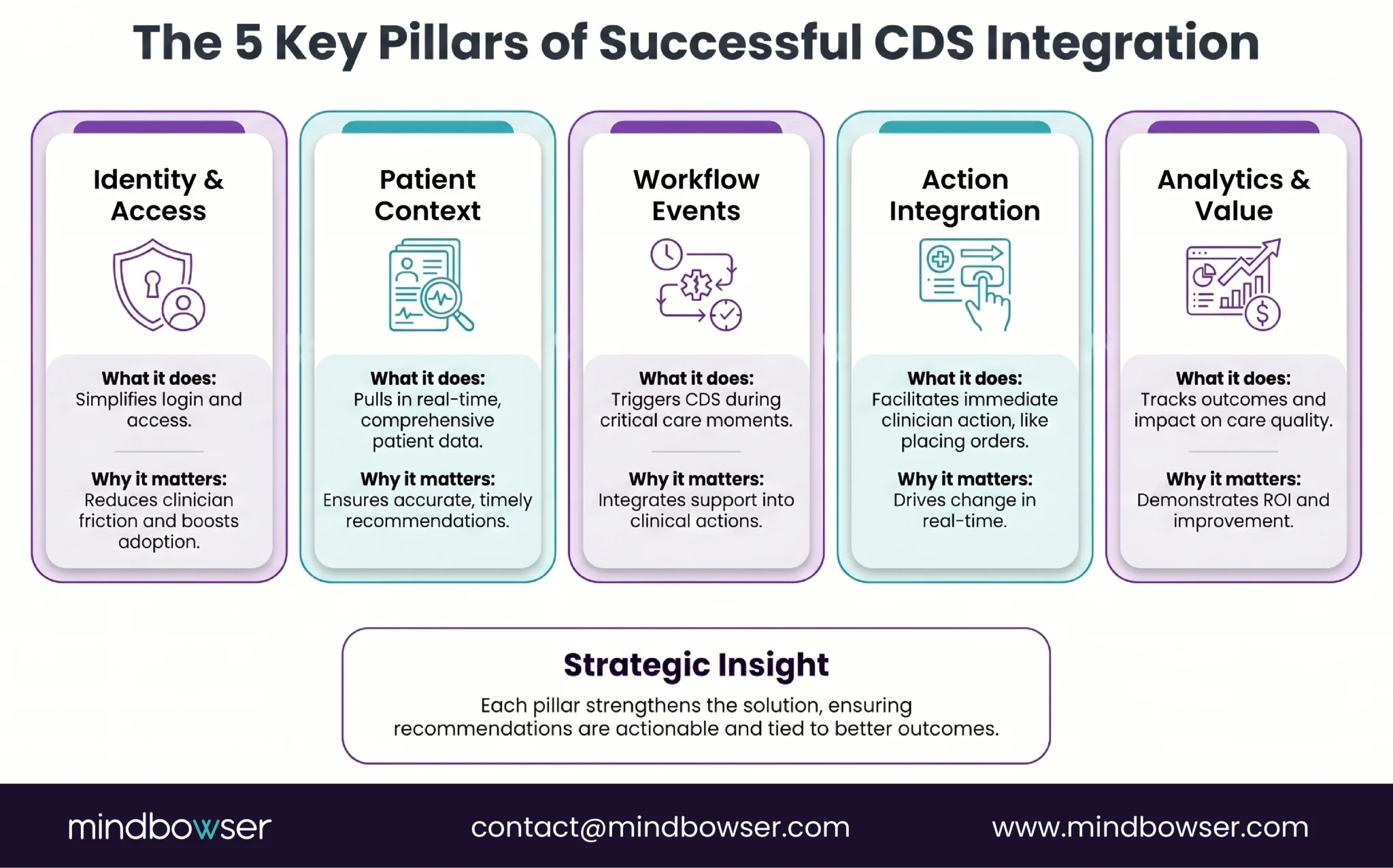
The foundation of a successful clinical decision support (CDS) tool begins with seamless identity and access integration. Single sign-on (SSO) and role-based access control are critical for reducing login friction and ensuring clinicians can access decision support without unnecessary delays.
When a clinician logs into the EHR, the CDS tool should automatically be available without requiring them to log into a separate system or re-authenticate.
Minimizing launch friction ensures that the tool is readily available when needed, fostering higher adoption rates. Role-based permissions are equally important, as they ensure that the right information and recommendations are presented to the appropriate healthcare professional, tailored to their specific responsibilities and authority.
B. Layer 2: Patient Context Integration
CDS tools can only be as effective as the patient data they work with. To deliver meaningful recommendations, a CDS app must integrate deeply with the patient context within the EHR. This includes demographics, medical problems, medication lists, allergies, lab results, visit context, care plans, and prior utilization history.
The key is ensuring the CDS tool has access to comprehensive, up-to-date data to generate accurate, personalized recommendations. For example, if a patient’s medical history isn’t complete within the EHR, the CDS tool might offer generalized advice that misses crucial nuances of the patient’s condition.
By integrating all patient data and keeping it current, the tool can provide more accurate, targeted recommendations that directly impact clinical decisions.
C. Layer 3: Workflow Event Integration
To maximize the impact of CDS, it must integrate with key workflow events throughout the clinical process. These events include order entries, clinical documentation, results reviews, referrals, and discharge planning.
When these workflows are connected, CDS tools can trigger relevant recommendations or actions precisely when they are most needed.
For example, when a clinician enters a medication order, the CDS tool can alert them to a potential drug interaction or suggest an alternative based on the patient’s medical history.
Similarly, during discharge, CDS can ensure that patients receive appropriate follow-up care or preventive services based on their condition. Integration with workflow events enables CDS to respond to real-time needs, drive action, and improve clinical outcomes.
D. Layer 4: Action Integration
The true value of CDS lies in its ability to drive action. This integration layer ensures that clinicians can not only receive recommendations but also take immediate action within the system.
Whether that action involves placing orders, scheduling referrals, updating care plans, or documenting follow-up tasks, the CDS tool must enable these actions directly within the EHR.
Action integration eliminates unnecessary steps, such as re-entering information into separate systems or manually transcribing recommendations.
For example, when a CDS tool identifies a care gap, it should automatically assign the task to the appropriate clinician or team member for follow-up and even provide documentation shortcuts to improve efficiency. This integration of actionable steps enables clinicians to act quickly, ensuring the care pathway is carried out without delay.
E. Layer 5: Analytics and Value Integration
The final layer of integration involves connecting CDS performance to analytics and value measurement.
A successful CDS tool must be able to track its own usage and measure the impact of its recommendations on clinical and operational outcomes. By integrating analytics into the workflow, healthcare organizations can assess the effectiveness of the CDS system in real-time.
Metrics such as clinician acceptance rates, care gap closure rates, and time saved can demonstrate the tool’s value in improving quality and reducing costs.
More importantly, these metrics should directly align with value-based care (VBC) goals, such as improving patient outcomes, reducing readmissions, and optimizing care delivery. By aligning the CDS tool with enterprise goals, organizations can ensure that their investment in decision support delivers measurable, actionable value.
V. Why This Is Especially Critical in Value-Based Care
A. VBC Requires Action at the Point of Care
In value-based care (VBC) models, healthcare organizations are financially incentivized to improve patient outcomes, reduce unnecessary utilization, and deliver more preventive care.
However, these goals can only be achieved if clinical decisions are made in real-time during patient encounters, rather than after the fact. This is where deep EHR integration becomes crucial for clinical decision support (CDS).
In VBC, care gaps must be identified and addressed during the patient visit, not weeks later during a retrospective review.
Risk adjustment opportunities, such as capturing accurate diagnoses and treatments, must be documented immediately during the encounter to ensure proper reimbursement.
If CDS tools are not integrated directly into the workflow at the point of care, clinicians may miss key opportunities to close gaps or capture risk-adjustment codes, which can negatively affect both patient care and financial performance.
B. Fragmented CDS Hurts Quality and Margin
Separate, disconnected CDS tools- those that don’t integrate well with the EHR or with other systems- are a significant barrier to improving quality and reducing costs. When tools are fragmented, they create inconsistencies in the clinical decision-making process.
Clinicians may receive different information or recommendations at different points in their workflow, leading to confusion, inefficiency, and potential errors.
Fragmentation also means that critical follow-up actions, such as scheduling a patient for a preventive service or initiating post-visit care, may be missed or delayed. This undermines VBC’s goal of proactively managing care and reducing avoidable utilization.
The result is higher costs, worse patient outcomes, and a lower return on investment for healthcare organizations.
C. Deep EHR Integration Makes CDS Operationally Useful
When CDS tools are deeply integrated within the EHR, they become operationally useful, not just theoretical. These tools should trigger decision support at key points in the care process, such as during routine primary care visits or when managing high-cost chronic conditions.
For example, a CDS tool integrated into a primary care visit might flag a care gap, such as a missed preventive screening, during the examination, prompting immediate action.
In chronic care management, a CDS tool might alert the clinician to a patient’s deteriorating health, triggering an appropriate intervention, such as medication adjustment, initiation of a care pathway, or referral to a specialist.
Similarly, for high-risk patients, CDS can route recommendations to care managers for follow-up, ensuring continuous care beyond the point of contact. This level of integration ensures that decision support is timely, actionable, and aligned with VBC’s goals.
D. VBC-Relevant Examples to Include in Draft
To illustrate the effectiveness of deeply integrated CDS tools in VBC, consider some real-world examples:
- HEDIS or Stars Care Gap Closure During Visits: CDS tools integrated within the workflow can alert clinicians to missed preventive care or chronic disease management tasks, helping to close care gaps and improve HEDIS (Healthcare Effectiveness Data and Information Set) or Stars ratings.
- Risk Adjustment Prompts Tied to Documentation Quality: By providing real-time prompts about diagnosis codes or treatment plans, CDS tools can ensure that risk adjustment opportunities are captured during the patient visit, leading to more accurate coding and better reimbursement under VBC models.
- Readmission-Risk Workflows that Trigger Discharge Coordination: CDS tools can identify patients at high risk for readmission, triggering actions such as follow-up care coordination or discharge planning to reduce readmissions and ensure patients receive the necessary post-discharge support.
- Referral Management and Follow-Up Orchestration for High-Risk Cohorts: By integrating CDS with referral management and follow-up processes, health systems can ensure that patients requiring specialty care or additional services are appropriately referred and that care is coordinated across the care continuum.
PakarPBN
A Private Blog Network (PBN) is a collection of websites that are controlled by a single individual or organization and used primarily to build backlinks to a “money site” in order to influence its ranking in search engines such as Google. The core idea behind a PBN is based on the importance of backlinks in Google’s ranking algorithm. Since Google views backlinks as signals of authority and trust, some website owners attempt to artificially create these signals through a controlled network of sites.
In a typical PBN setup, the owner acquires expired or aged domains that already have existing authority, backlinks, and history. These domains are rebuilt with new content and hosted separately, often using different IP addresses, hosting providers, themes, and ownership details to make them appear unrelated. Within the content published on these sites, links are strategically placed that point to the main website the owner wants to rank higher. By doing this, the owner attempts to pass link equity (also known as “link juice”) from the PBN sites to the target website.
The purpose of a PBN is to give the impression that the target website is naturally earning links from multiple independent sources. If done effectively, this can temporarily improve keyword rankings, increase organic visibility, and drive more traffic from search results.