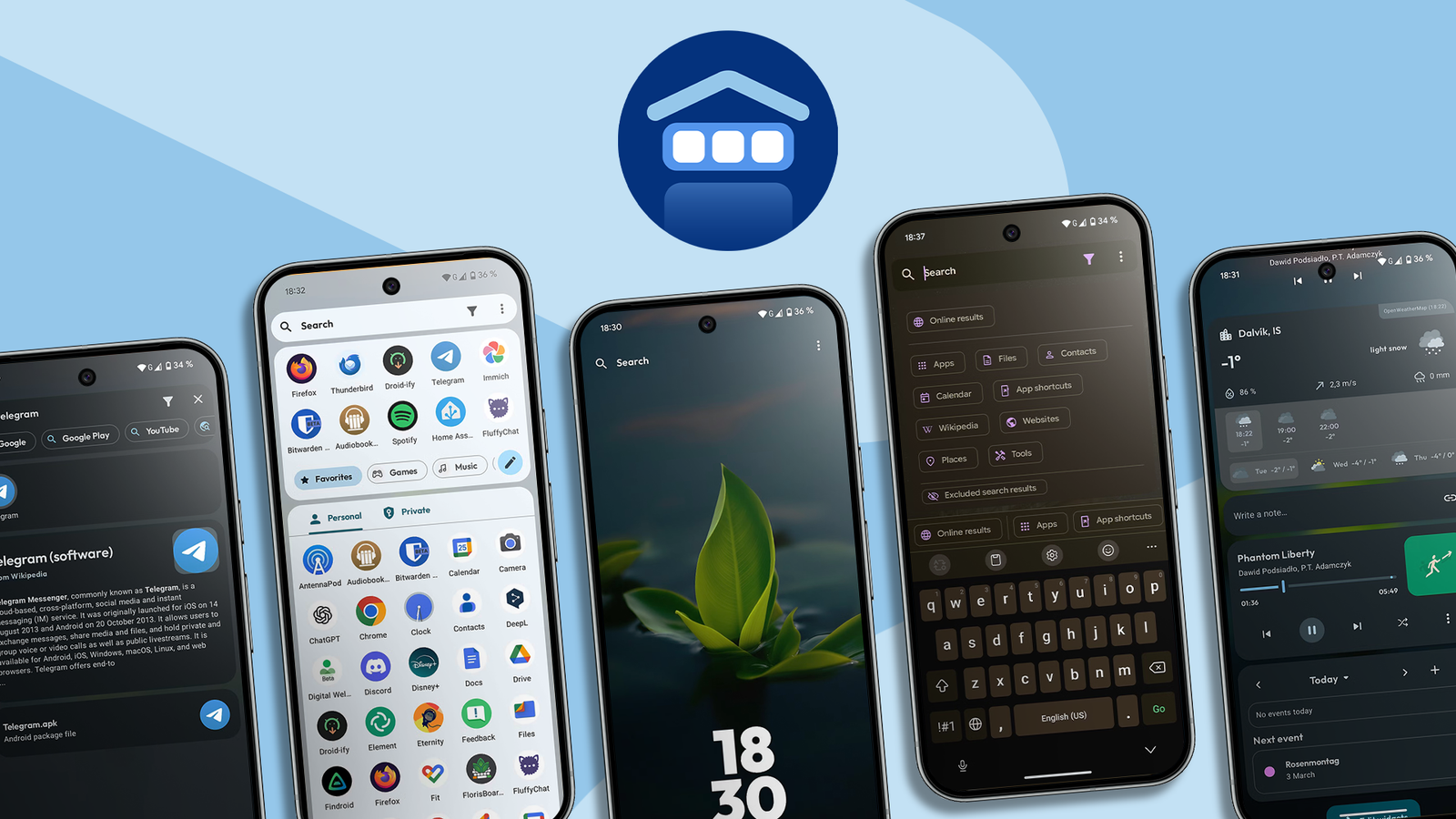
An invisible kind of friction builds up the longer you keep and use a phone. It balloons with apps and files, making it a tiny bit harder to find what you need when you look.
It happens on computers too, but they have apps like macOS Spotlight or Windows PowerToys palette to surface apps, settings, files, and more in the blink of an eye.
Android has evolved tremendously, but it never got a mobile version of the Spotlight. Or a universal search bar where you can look up everything in one place: files, apps, app settings, system settings, contacts, web searches, widgets, calculations, conversions, and so on.
You can imagine how handy it could be when every other launcher is mostly reliant on grid-based drawers, fragmented search bars, and itemized scrolling.
That’s basically the promise of the Kvaesitso launcher.
What makes this launcher special
Also, why do Android launchers feel like clones?
Many popular Android launchers are based on the stock Android Open Source Project Launcher (AOSP launcher). Google’s Pixel launcher, Samsung’s OneUI launcher, Nova launcher, Lawnchair, Neo, Action, and Fossify launcher share the same codebase.
It’s why, at least on some level, they feel identical. They’re built around the concept of static grid icons placed on docks, home screens, and drawer screens.
It’s also why Android’s search features feel like an afterthought. The search bars are fragmented and scattered across the interface because the grid is the priority.
Kvaesitso launcher (pronounced kuh-ve-sit-so) is built from scratch around a unified search bar instead of icon grids. It doesn’t borrow its design or code from the mainstream launchers, so it naturally feels different.
Kvaesitso handles search like no other launcher
The closest we can get to ‘Spotlight on Android’
Let me show you how the global search works in this launcher.
There are several ways to drop into the search bar. There’s a shortcut on the home screen. Tapping it opens the keyboard and the app drawer at the same time. Alternatively, you can swipe down on the home screen to pull up this same interface.
Try typing a query and tapping the Enter button on the keyboard to instantly open the highlighted item.
Note the several chips placed above your keyboard and below the search bar. You can scroll to the side to reveal more.
By default, the search bar looks through all these categories. If you tap those chips, the results will be filtered and limited to that chip’s category.
These chips are search filters for web searches, apps, your local files, contacts, calendar events, places on Maps, Wikipedia results, app settings, Google Play Store, YouTube, and more.
Kvaesitso, by default, will always search through these categories, and you can customize the default filters and what chips show up in the search bar in the settings menu.
In simpler terms, a single search query may return matching app shortcuts, app features, contacts, documents, media files, email addresses, and more.
In this context, app features mean different menu items and buttons in an app that are typically only available when you open it.
For example, looking up a name might pull up threads from your email app or your messages (say, WhatsApp or Google Messages).
Or, searching upload might show you the direct upload button in Google Drive or social media apps that support that feature.
You can imagine how much of a lifesaver this unified search bar can be. It saves you the trouble of opening the Files app to look up your documents or media files.
Afterward, you might have to open the web browser to Google something. Then, another tap to open the maps app to find the address. And yet again, the small friction of switching to the messages, email, or contacts app to compose a message.
Instead, you get all those results in one place with one query.
The search field doubles as a command palette
You don’t have to open an app every time you pick up your phone
The Kvaesitso global search can do more than surface search results. It can also perform some neat actions.
If you type arithmetic expressions in the search field, it turns into a calculator and displays calculations as you type.
You can do all sorts of conversions the same way. Type a number with the unit next to it to surface a conversion table. It works with units of time, temperature, area, speed, length, mass, and even currencies.
You can enter a phone number to make phone calls from the same search bar. You can send a message to that number or add it to your contact list from the menu.
Instead of a phone number, you can enter an email address to compose an email from the search field.
Enter a website URL to open the website in your default browser. It can also display Wikipedia and Google searches. You can open queries in the YouTube app or the Play Store.
You can also set alarms, timers, and schedule events without leaving the search bar.
Kvaesitso does everything other launchers can
You won’t miss out on features if you switch
The search bar is arguably the star of the show, but that’s not all Kvaesitso has to offer.
It has nice built-in widgets for weather reports, quick notes, current media playback, and more available in the same swipe-down interface.
The Kvaesitso launcher also provides all the other features one could expect from a mature launcher app.
You can change the overall appearance of the app interface (color schemes, typography, transparency, and shape design).
It lets you customize the home screen with intuitive menus. You can alter the home, dock, and drawer grids and icons (it supports custom icon packs, too). You can also customize gestures, the search bar, widgets, and language.
Kvaesitso is a beautiful launcher, and it makes navigating your phone a delight (it might take a bit of muscle-memory change to get used to it at first).
The best part is that the app is totally free and open source. It does not collect or sell your data, which is a must for a mission-critical app like your phone’s default launcher.
PakarPBN
A Private Blog Network (PBN) is a collection of websites that are controlled by a single individual or organization and used primarily to build backlinks to a “money site” in order to influence its ranking in search engines such as Google. The core idea behind a PBN is based on the importance of backlinks in Google’s ranking algorithm. Since Google views backlinks as signals of authority and trust, some website owners attempt to artificially create these signals through a controlled network of sites.
In a typical PBN setup, the owner acquires expired or aged domains that already have existing authority, backlinks, and history. These domains are rebuilt with new content and hosted separately, often using different IP addresses, hosting providers, themes, and ownership details to make them appear unrelated. Within the content published on these sites, links are strategically placed that point to the main website the owner wants to rank higher. By doing this, the owner attempts to pass link equity (also known as “link juice”) from the PBN sites to the target website.
The purpose of a PBN is to give the impression that the target website is naturally earning links from multiple independent sources. If done effectively, this can temporarily improve keyword rankings, increase organic visibility, and drive more traffic from search results.