
Most developers learn about stacks and queues once, pass a test, and then forget about it. They feel like “interview stuff” that is useful for the whiteboard, is useless on the job.
That belief is wrong.
If you’ve ever created an undo button, hit a back button, scheduled a background email, or wondered why your (setTimeout) runs after a (Promise), you’ve used stacks and queues. You just don’t call them by name.
This post shows you where these two data structures actually appear in everyday React and Node.js work. No heavy theory, lots of examples, and code you can actually use.
Two Minute Refresher (No Jargon)
Before the use cases, here’s all the theory you’ll need.
A stack works like a stack of plates. You add plates on top of it, and you take plates off of it. The last item you put in is the first item you take out. This is called LIFOwhich stands for Last In, First Out.
A queue works like a line at a coffee shop. The first person to join the line is the first person to be served. The first item you put in is the first item you take out. This is called FIFOwhich stands for First In, First Out.
That’s the whole idea. The stack reverses the order; queue keeping orders. Everything below is just two rules applied to real problems.
Use Case Stacks in React
1. Undo and Redo (Classic)
Every editor needs undo and redo, whether it’s a notes app, a form builder, or a drawing tool. Stacks are a natural choice.
You keep two stacks. One holds a past state (the “undo” pile). One handle says you undo the button (the “redo” stack). When the user makes changes, you put the old state into the undo stack. When they hit undo, you turn off the top state and move it to the repeat stack.
Here’s a small working example using React hooks:
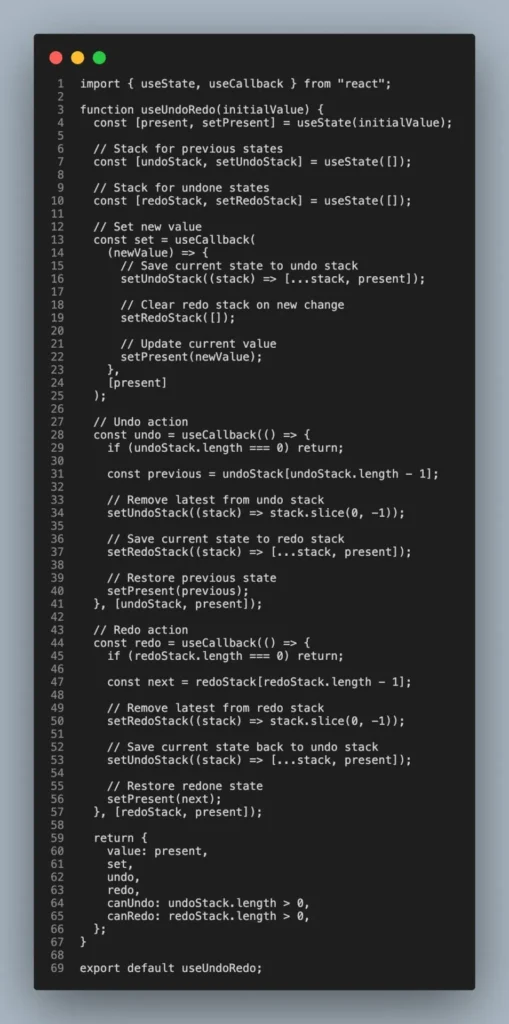
Note the stack operations: push (add to the end of the array) and pop (remove from the end). That “last in, first out” behavior is what makes canceling feel natural, because you always cancel the newest thing first.
2. Navigation History and Back Button
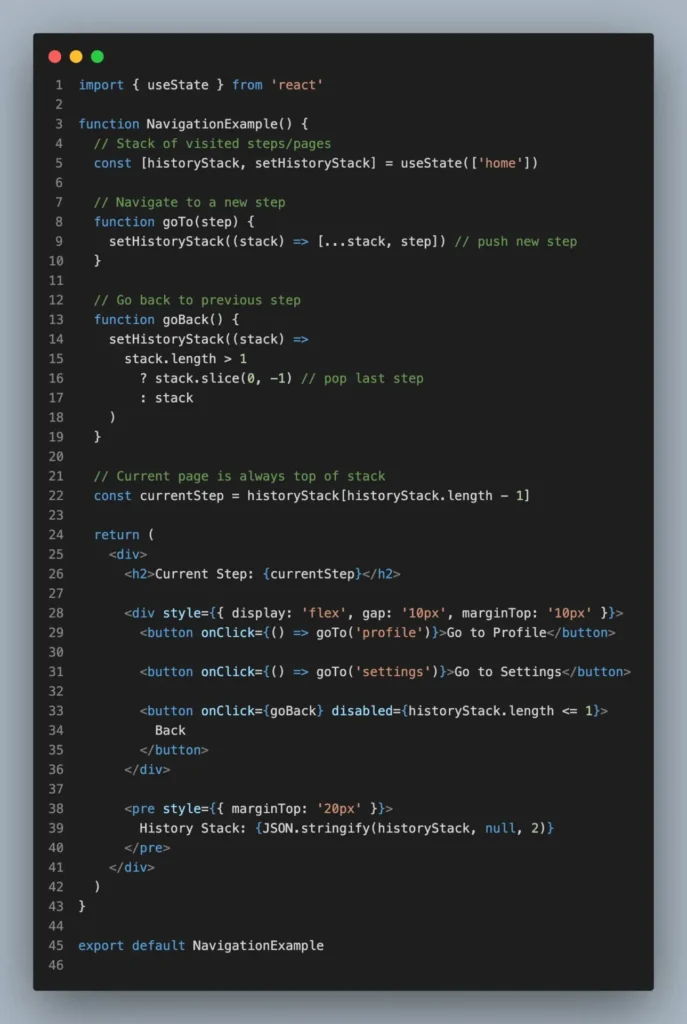
Think about how a browser’s back button works. Every page you visit will be put into a stack. When you press return, the current page will appear, and you will land on the previous page.
React applications that use client-side routing rebuild this idea. Wizards or multi-step forms often keep a stack of visited steps so that the “back” button returns the user to the original step, not just step number minus one.
3. Stacked Modals and Overlays
Open capital. From within, open the confirmation dialog. Now press Escape. Which one should be closed? The top one. Then Escape returns to close the next one. This is a stack.
Storing open modals in a stack allows you to close them in the correct order and manage focus and z-index neatly. Every new capital is pushed upwards; each Escape or close appears at the top.
Queue Use Cases in React (and Browsers)
4. Event Loop: Micro Tasks vs Macro Tasks
This is a question that confuses many developers. What does this print?
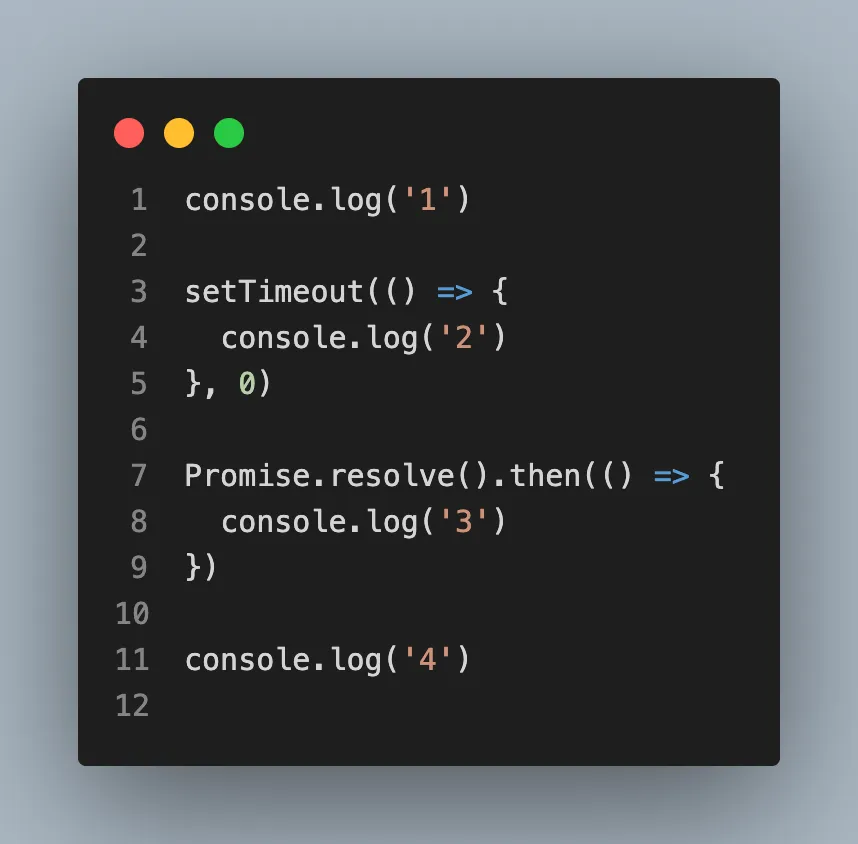
The answers are (1), (4), (3), (2), not (1), (2), (4), (3)
The reason is the queue. JavaScript has two important queues. The macro task queue holds things like callbacks (setTimeout). That micro task queue stores things like resolved callbacks (Promises). After the main code is executed, the engine drains the entire microtask queue first, then fetches one macrotask.
So 3 (micro task) skips 2 (macro task), even though setTimeout is written first. Both queues are FIFO, first in, first out, but the microtask queue has a higher priority. Understanding this one idea fixes a huge number of “why is my code running in the wrong order” bugs.
5. Animation and Batching Updates
React batch state updates and process them sequentially rather than re-rendering on each setState. Browser animations work the same way via requestAnimationFrame, which constructs a callback to run before the next paint. In both cases, jobs are added to the queue and processed in the order they arrive, which keeps the UI running smoothly rather than stuttering.
PakarPBN
A Private Blog Network (PBN) is a collection of websites that are controlled by a single individual or organization and used primarily to build backlinks to a “money site” in order to influence its ranking in search engines such as Google. The core idea behind a PBN is based on the importance of backlinks in Google’s ranking algorithm. Since Google views backlinks as signals of authority and trust, some website owners attempt to artificially create these signals through a controlled network of sites.
In a typical PBN setup, the owner acquires expired or aged domains that already have existing authority, backlinks, and history. These domains are rebuilt with new content and hosted separately, often using different IP addresses, hosting providers, themes, and ownership details to make them appear unrelated. Within the content published on these sites, links are strategically placed that point to the main website the owner wants to rank higher. By doing this, the owner attempts to pass link equity (also known as “link juice”) from the PBN sites to the target website.
The purpose of a PBN is to give the impression that the target website is naturally earning links from multiple independent sources. If done effectively, this can temporarily improve keyword rankings, increase organic visibility, and drive more traffic from search results.